CSAT.AI for Zendesk Support
AI-powered CSAT: Surveys, brand-aligned QA, VoC insights, ROI & coaching cards
About this app
CSAT.AI — QA, CX, Coaching & ROI in Your Brand’s Own Voice
The problem: CX teams measure activity—but generic surveys and many Auto/GPT QA tools rely on one-size rubrics, model lock-in, and weak evidence, so they don’t capture your brand voice, customer intent, or business impact. Leaders are left without clear VoC and ROI signals.
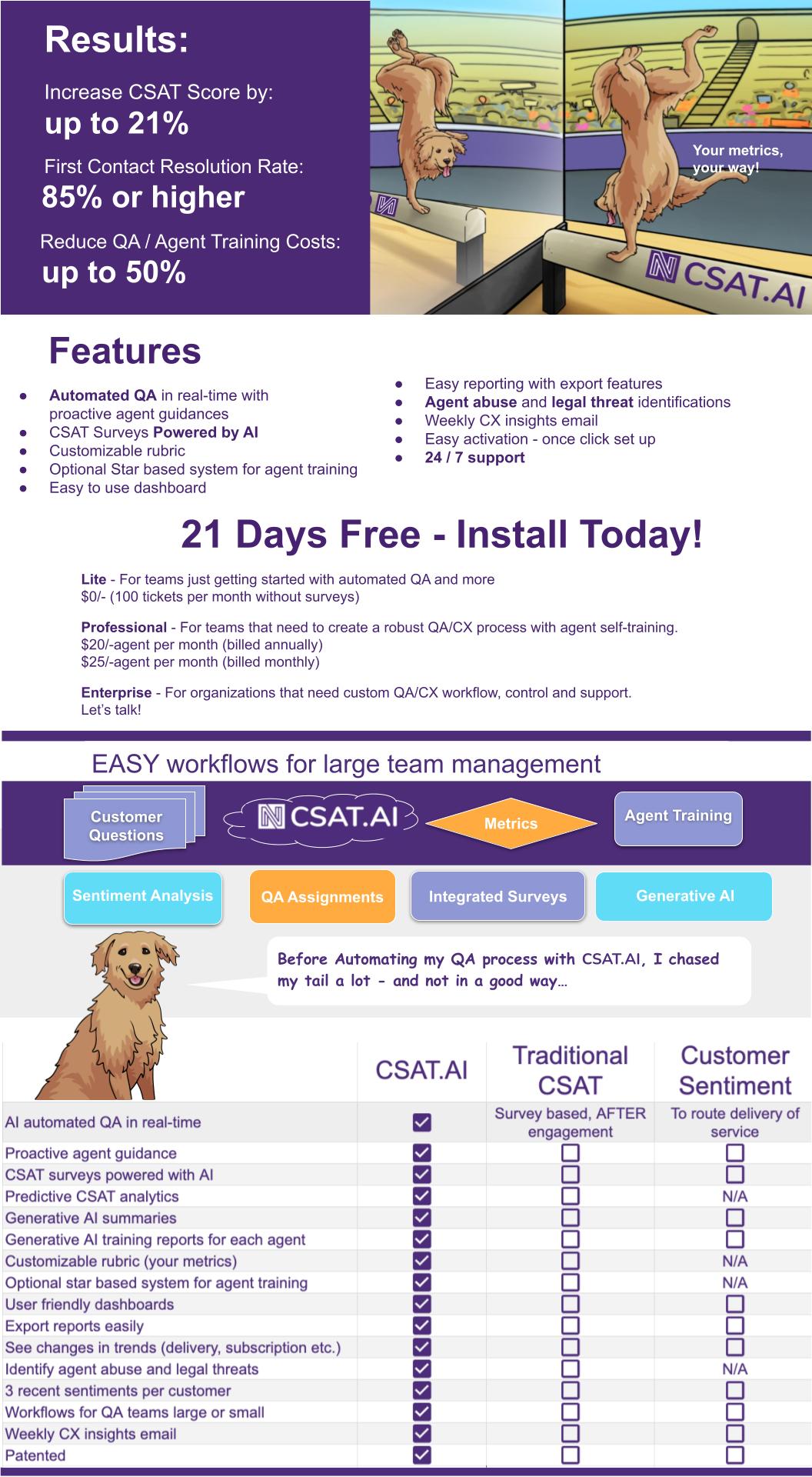
Overview image (below) showcases: Results, Features, Plans, Workflow, Tiles, and Comparison—including brand-aligned automated QA, AI Surveys, VoC→KPIs→ROI, model-flex (our model / OpenAI / Claude / Gemini), security posture (SOC 2, ISO 27001, GDPR/HIPAA-aware), and more.
The solution: Brand-Aligned CX Intelligence for Zendesk
CSAT.AI analyzes 100% of Zendesk Support conversations (chat, email, voice), scores them against your brand’s communication DNA, and links results to KPIs & ROI. Generative AI is built in for custom metrics and summaries.
What you get (at a glance)
- Brand-aligned automated QA (empathy, clarity, resolution, compliance)
- AI Surveys with smart delivery & fatigue controls
- VoC → KPIs → ROI Actions
- Coaching Cards tied to Moments & outcomes
- Model-flex: our tuned model or OpenAI / Claude / Gemini
Voice of Customer (VoC)
We cluster open feedback into Rank, Trend, Signals, KPIs, ROI Action so leaders can move fast.
Why most Auto/GPT QA falls short
- Generic rubrics (not your brand/policies)
- Model lock-in (single-vendor constraints)
- Weak evidence (poor traceability)
- Hallucination risk (limited guardrails)
- No ROI linkage (not tied to cost/retention/revenue)
Why CSAT.AI for Zendesk
- Zendesk-native: deployment in hours
- Full coverage: 100% auto-scored (chat/email/voice)
- VoC + ROI: trends, signals, and actions leaders can use
- Model-flexible: our tuned model or OpenAI / Anthropic Claude / Google Gemini
- Security & Privacy: SOC 2 Type II, ISO 27001, GDPR-aware, HIPAA-aware (US/EU/UK)
Security & Data Handling
Your data stays yours. We use it only to score quality, run CSAT surveys, surface VoC/ROI, and power the dashboards you see.
What we process- Zendesk ticket content + metadata (for QA, VoC, ROI summaries)- Survey responses linked to ticket/user metadata- App config (metrics/rubrics), optional agent name/photo for survey bio- Zendesk OAuth/API keys (encrypted)
What we don’t do- No selling data- No training public models on your data- No access to end-user payment credentials
Models (your choice)- Run on our tuned model by default- Optional “model-flex” (OpenAI / Anthropic Claude / Google Gemini) in no-training / data-control modes- Minimize prompts, mask obvious identifiers where feasible- You can disable external model calls
Security & compliance- Encryption: TLS 1.2+ in transit, AES-256 at rest- Access: RBAC, SSO options, least-privilege- Audit: admin logs for scoring/exports/config changes- Posture: SOC 2 Type II, ISO 27001 practices; GDPR-aware, HIPAA-aware- Data residency: US by default; EU/UK on request- Subprocessors: limited, under DPA; list available on request- Incident response: 24/7 monitoring; notify per contract/DPA
Retention & deletion- Defaults to 12 months for derived analytics (configurable)- Hard deletion on uninstall or written request- You remain data controller; CSAT.AI is data processor (DPA available)
API credentials- Stored encrypted with managed KMS; access is restricted and audited
Questions or a DPA/subprocessor list? security@csat.ai or support@csat.ai.
Pricing, results, feature grid, workflow, tiles, and comparison are presented in the overview image above.```
App details
How to install
Activate your 21-day free trial of CSAT.AI:
1) Click Install on this page and approve permissions for your Zendesk account.2) Click the "N" icon on the left sidebar to launch the Admin Dashboard. If it doesn’t open, disable your browser pop-up blocker and try again.3) Go to Settings → paste your API Key → Save.4) Follow the guided steps to create your Brand-Voice–Aligned QA Metrics.5) (Optional) Choose your model (CSAT.AI tuned model or OpenAI/Claude/Gemini), enable AI Surveys, and set SSO/data residency.
Need help? Visit https://www.csat.ai/order or email support@csat.ai.
Leave a review
Share your experience with the rest of the Zendesk community