HelpCenter.io
Bring together your HelpCenter.io knowledge base and your help ticketing
Total de instalações
Less than 5
Funciona com
Support
Developer
HelpCenter.io
Sobre este aplicativo
HelpCenter.io allows you to create a great-looking and fully customizable external or internal knowledge base.
With this app, you can access all the information from your HelpCenter.io knowledge base while solving customer support tickets in Zendesk. Easily insert links and content right into the ticket reply editor. Get smart suggestions for relevant articles from your HelpCenter.io knowledge base.
Data & Privacy
What data is accessed: This app accesses Zendesk ticket data (ticket subject, description, and comments) as well as agent and end-user identity information (name and email) solely to display relevant knowledge base articles in the ticket sidebar.
Where data is stored and transmitted: All data is transmitted securely over HTTPS to HelpCenter.io servers hosted on Amazon Web Services (AWS). Data is encrypted both in transit (TLS) and at rest (AES-256). The app authenticates with HelpCenter.io using a secure, per-installation integration token generated in the HelpCenter.io dashboard. This token is stored as a secure parameter by Zendesk and is never exposed to the client side — all API requests are proxied through Zendesk's server-side request infrastructure.
Third-party sharing: Customer data is never sold, shared with third parties, or used to train machine learning models.
Data retention and deletion: HelpCenter.io does not permanently store Zendesk ticket data. Ticket content is processed in real time to surface relevant articles and is not retained after the session ends. You may request deletion of any account-level data by contacting support@helpcenter.io.
Privacy policy: https://helpcenter.io/legal/privacy
For more information on Zendesk's enhanced security guidelines for third-party apps, see: https://support.zendesk.com/hc/en-us/articles/9590471542170
Detalhes do aplicativo
Como instalar
- Log in to your help center dashboard on https://helpcenter.io/app/signin and select the help center you want to connect to your Zendesk workspace.
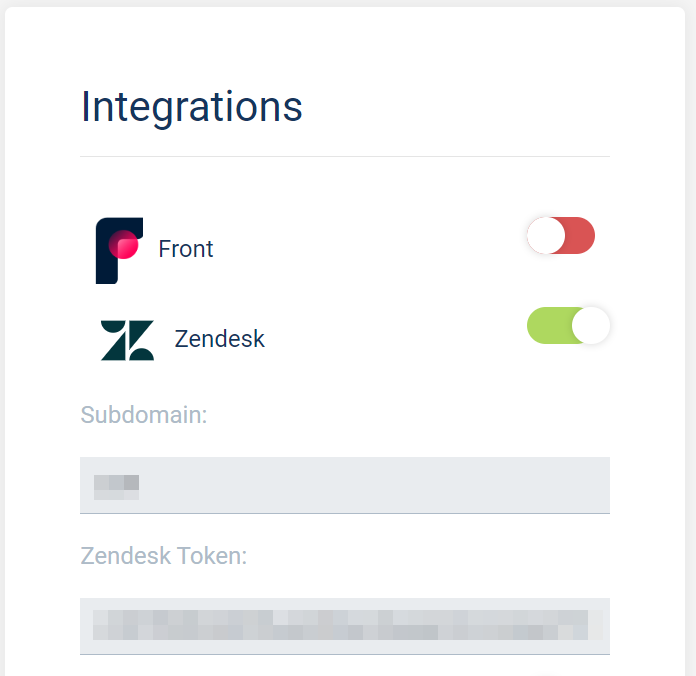
- In your help center dashboard, go to Settings -> Integrations:
and toggle the Zendesk integration on.
Once the integration has been enabled you will see the subdomain of your current help center together with a Zendesk token.
You will need both of these in the next step, so please note them down or keep this page open so you can easily copy and paste on the next step.

You will now see the HelpCenter.io app in the sidebar of your Zendesk ticket view. You can use it to search for articles in your help center and insert them into your ticket replies.
Deixe uma avaliação
Compartilhe sua experiência com o resto da comunidade Zendesk