Cloud contact center: What it is, how it works & top solutions 2026
Cloud contact center software enables you to rapidly scale customer service operations up or down according to demand. Try it today.

Última atualização em May 25, 2026
A guide to the best cloud contact centers
Customer satisfaction begins with providing effortless customer interactions. But one obstacle often gets in the way: detangling your web of communication channels. When your calls, chats, and social media conversations exist in disconnected systems, you’re fighting an uphill battle to streamline the customer experience (CX).
Cloud contact center software acts like your company’s skeleton key, consolidating communication into a single system so your team can stay organized and focused on what matters most—the customer. Position your business as an industry leader in customer experience by embracing the best cloud contact center solution. Our guide has all the details you need to choose the right one for your business.
More in this guide:
- What is a cloud contact center?
- Understanding how cloud contact centers work
- The difference between a cloud contact center and a cloud call center
- Benefits of a cloud-based contact center solution vs. on-premise contact centers
- Features of a cloud contact center
- Cloud contact center solutions comparison chart
- The 6 best cloud contact center software
- Key cost factors behind cloud contact center platforms
- A guide to choosing the right cloud contact center
- Frequently asked questions
- Try the best cloud contact center software today
What is a cloud contact center?A cloud contact center is a virtual solution that manages customer and employee interactions across various channels. In addition to tackling inbound and outbound calls, contact center agents handle communications through email, chat, messaging, and social media. The right cloud contact center software unifies customer conversations and context across channels and systems, allowing your team to deliver the highest levels of customer service while ensuring agents have all the tools they need. |
Understanding how cloud contact centers work
A cloud contact center uses cloud computing infrastructure to manage customer interactions across multiple communication channels. Organizations subscribe to a cloud-based service that hosts the necessary contact center functionality. Customer interactions, whether through phone calls, emails, chats, or social media, are handled and routed through the cloud platform.
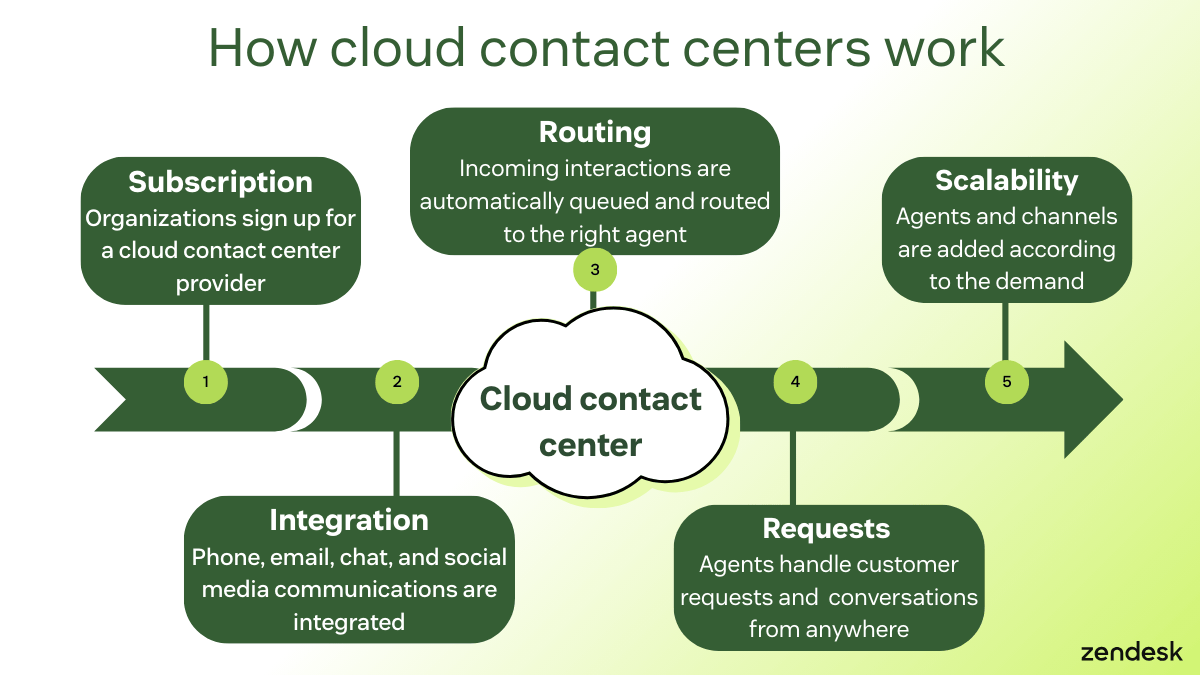
Cloud contact center software allows for greater scalability because you can easily adjust resources to accommodate fluctuating needs, like adding more channels or employees. Agents can access the contact center tools remotely, ensuring flexibility and accessibility. Automatic updates and maintenance from the software provider contribute to the efficiency and effectiveness of the cloud contact center, making it a modern and adaptable solution for customer service needs.
The difference between a cloud contact center and a cloud call center
On the surface, a cloud call center and a cloud contact center might appear the same thing. Many people even use the terms interchangeably. The truth is, there are subtle yet significant differences that set them apart:
-
Call centers primarily manage phone calls. Generally, call centers come in two forms:
- Inbound call centers help queue calls before routing them to live agents.
- Outbound call centers enable agents to contact customers using software with productivity tools and integrations that boost efficiency.
- Cloud contact centers can do everything call centers can and offer support over many other digital communication channels, including email, live chat, messaging apps, and self-service.
Note: Your cloud contact center can—and should—evolve as new communication methods hit the market and your customer’s preferred communication channels change. A cloud contact center can provide support options beyond the phone to satisfy your customers and simplify your teams’ jobs. It even offers flexibility for remote teams by forwarding calls to mobile devices or external numbers when agents are away from their desks.
Benefits of a cloud-based contact center solution vs. on-premise contact centers
Cloud-based and on-premise contact centers differ in several core criteria, each with advantages and considerations. Here's a quick comparison:
|
Criteria |
Cloud-based contact center |
On-premise contact center |
|
Infrastructure |
This type relies on cloud computing infrastructure provided by third-party vendors. No physical servers or equipment are maintained on site. |
Organizations must invest in and maintain their physical infrastructure, including servers, networking, and other hardware. |
|
Scalability |
Organizations can easily scale resources up or down based on demand. |
Scalability is limited to the organization's existing infrastructure, making it less flexible in adapting to sudden changes in volume. |
|
Cost structure |
It typically follows a pay-as-you-go or subscription model, with costs based on actual usage. It avoids large upfront capital expenditures. |
This type involves significant upfront costs for hardware, software licenses, and ongoing maintenance. |
|
Maintenance |
Vendors are responsible for handling maintenance, updates, and security. This reduces the burden on organizations. |
Organizations are responsible for maintaining and updating their systems. |
|
Accessibility |
It offers remote accessibility, allowing agents to work from different locations. It also provides greater flexibility in managing a distributed workforce. |
Agents typically need on-site access to the contact center infrastructure, limiting flexibility in remote work scenarios. |
|
Integration |
This type integrates easily with other cloud services and APIs, providing a seamless connection to external tools and applications. |
Integrating tools with on-premise contact centers may require more effort and resources, and compatibility with other systems may vary. |
|
Security |
Cloud providers implement robust security measures, storing data in secure data centers. Security compliance is a shared responsibility between the organization and the vendor. |
Organizations have more direct control over their security measures but bear full responsibility for implementing and maintaining them. |
Features of a cloud contact center
To handle high volumes of customer interactions, you’ll need a cloud contact center that helps your agents stay organized and efficiently handle issues while creating a great customer experience. Here are some key features that can help your team thrive.

Omnichannel support
Traditional communication tools exist in a disconnected workspace, with channels siloed in individual systems or windows. Cloud contact center software enables omnichannel experiences by integrating your communication channels into a unified platform.
Agents can view and respond to customer inquiries across phone calls, emails, chats, and social media interactions from a single dashboard, providing a holistic and real-time view of customer interactions. Agents can easily switch between channels, access customer history, and maintain context, fostering more cohesive and personalized engagement throughout the customer journey.
Advanced routing and IVR
Cloud contact center software enhances customer interaction management through advanced routing and interactive voice response (IVR) features. With sophisticated routing capabilities, incoming interactions are intelligently directed to the most suitable agent based on predetermined criteria such as skills, availability, and customer interaction history.
Additionally, cloud contact centers leverage IVR systems that allow customers to interact with automated voice menus to route their inquiries or complete self-service tasks. You can customize these IVR systems to guide callers through options, gather information, and route them to the appropriate department or agent.
Unified customer profiles
Cloud contact center software excels in creating unified customer profiles by connecting data from different channels and key business systems. Unlike traditional setups where data gets siloed across different systems, a cloud-based solution gathers information from multiple sources such as customer relationship management (CRM) systems, billing tools, and more. This holistic view of interaction history can lead to greater customer satisfaction.
Real-time monitoring and historical reporting
Cloud contact center software can offer real-time monitoring and historical reporting, which gives organizations valuable insights into their contact center operations. A cloud contact center with built-in call monitoring software lets managers oversee ongoing interactions, track agent performance, and identify potential issues using live dashboards, allowing them to make immediate adjustments to optimize efficiency and customer service.
On the other hand, historical reporting features enable in-depth analysis of past performance trends and customer interactions. By collecting data over time, organizations can identify patterns, measure the effectiveness of strategies, and make data-driven decisions to enhance overall contact center performance.
Workforce optimization tools
Look for a cloud contact center solution with workforce optimization tools designed to enhance agent productivity, performance, and overall operational efficiency. Call center workforce management features, like the Zendesk AI-powered WFM tools, can assist in forecasting and scheduling, ensuring the appropriate number of agents with the right skills are ready to handle anticipated call volumes.
Quality monitoring tools
Quality monitoring tools can also enable supervisors to assess agent interactions, providing valuable feedback for improvement. With a solution like Zendesk QA, businesses can automate quality assurance tasks, like performance and conversation analysis, to identify areas for optimization. Additionally, coaching features allow managers to provide targeted training and support to agents while agents interact with customers.
Apps and integrations
The digital nature of cloud contact centers makes it easy to extend their capabilities by integrating them with external systems and tools. Some solutions are ready-made with pre-built integrations to supercharge your current system and enhance customer and agent experiences.
Businesses commonly choose to integrate their contact centers with:
- Marketing or email automation software
- Billing and shipping tools
- Sales CRMs
Many organizations also leverage computer-telephony integrations to connect their phone systems directly with their business applications.
It’s important to look for a solution that offers a robust selection of integrations, too. The Zendesk Marketplace, for instance, provides access to over 1,500 pre-built apps and integrations that businesses can use to extend the functionality of their contact center.
Security
Cloud contact center software delivers comprehensive customer data privacy and security measures to safeguard sensitive information and maintain the integrity of communication channels. Cloud providers implement robust security protocols, including data encryption, secure access controls, and regular security audits to ensure compliance with industry standards. Multi-factor authentication can add an extra layer of protection, preventing unauthorized access.
Additionally, cloud contact center solutions often include features like real-time monitoring for suspicious activity and automatic security updates to address potential vulnerabilities promptly. It stores information in secure data centers with redundancy and disaster recovery measures to ensure business continuity.
Cloud contact center solutions comparison chart
Choosing the right cloud contact center wisely requires thorough research. It's essential to compare the best solutions in the market to make sure the one you chose is the best fit for your organization. Let's take a closer look at the six best cloud contact center solutions.
|
Software |
Best for |
Starting price |
Free trial |
|
Zendesk |
Best for unified omnichannel at scale |
$19 per agent/month (billed annually) |
14 days |
|
RingCentral Contact Center |
Best for phone-first contact centers |
$20 per agent/month (billed annually) |
30 days |
|
Nextiva |
Best for SMB all-in-one communications |
$15 per agent/month |
14 days |
|
CloudTalk |
Best for outbound calling teams |
$25 per agent/month |
14 days |
|
Talkdesk |
Best for AI-driven enterprise CX |
$85 per agent/month |
15 days |
|
8x8 |
Best for global cloud communications |
Custom pricing |
Unavailable |
The 6 best cloud contact center software
Our list of the top six cloud contact center solutions provides an overview of key features and pricing to help you better understand your options.
- Zendesk: Best for unified omnichannel at scale
- RingCentral Contact Center: Best for phone-first contact centers
- Nextiva: Best for SMB all-in-one communications
- CloudTalk: Best for outbound calling teams
- Talkdesk: Best for AI-driven enterprise CX
- 8x8: Best for global cloud communications
1. Zendesk
Best for unified omnichannel at scale

|
Starting price |
Free trial |
Key features |
|
$19 per agent/month billed annually Explore more Zendesk pricing plans. |
14 days |
|
Zendesk is a truly unified, cloud-based contact center solution built for complex, large-scale service environments. Bringing omnichannel support (voice, digital, and self-service) into a single, intuitive workspace, AI is deeply embedded across every channel. This removes gaps between agents, systems, and conversations, so teams can simplify daily operations while delivering faster, more consistent resolutions at enterprise scale.
Zendesk Contact Center pairs Voice AI Agents with advanced routing and IVR to handle high call volumes efficiently. It resolves simpler requests through natural conversations and escalates complex issues to the right live agent. Unified customer profiles provide full context for every interaction, helping agents personalize support and maintain continuity across channels. Plus, CX leaders improve decision-making with better visibility into customer engagement and sentiment.
Zendesk includes real-time monitoring and historical reporting to track SLAs and performance, alongside workforce optimization to forecast staffing needs. Furthermore, AI-powered insights and quality monitoring tools can automatically score interactions to surface coaching opportunities.
Finally, enterprise-level security includes encryption and compliance support (GDPR, HIPAA, SOC 2) while remaining cloud-native for faster deployment and global reliability.
|
Pros |
Cons |
|
|
What people are saying:
- “The best part of Zendesk Contact Center is the level of visibility it brings into our workflows. I can see what's coming in, how the work is distributed, and how quickly we're responding. The reporting and dashboards make it easy to understand trends.”—Verified user, G2 Review.
- “Zendesk for Contact Center shines with its intuitive interface and seamless omnichannel capabilities, making it remarkably easy to use for both agents and managers. The platform simplifies implementation with robust onboarding tools and flexible configurations, allowing teams to get up and running quickly.”—Verified user, G2 Review.
- “Zendesk is extremely user-friendly and simple to navigate. I really appreciate how easily I can move between tickets and profiles, merge interactions, leave both public and internal notes, escalate issues, and more.”—Verified user, G2 Review.
2. RingCentral
Best for phone-first contact centers

|
Starting price |
Free trial |
Key features |
|
$20 per agent/month (billed annually) |
30 days |
|
RingCentral Contact Center is a cloud-native omnichannel solution designed to streamline customer communications through a unified, AI-first platform. Catering to businesses of all sizes, it integrates voice, digital channels, and workforce engagement tools into a single interface. The platform's capabilities include advanced routing and IVR, unified customer profiles, as well as real-time monitoring and historical reporting.
Its AI-driven features offer real-time interaction summaries, sentiment analysis, and automated quality management to enhance agent performance. Additionally, RingCentral supports over 30 digital channels and features a developer ecosystem with APIs for seamless integration with CRM systems and business applications. Although the initial setup is easy, users report a steep learning curve for advanced features.
|
Pros |
Cons |
|
|
What people are saying:
- “The best thing about RingCentral Contact Center is how it unifies customer interactions across multiple channels with AI-powered efficiency... everything calls, messages, and customer info is in one place.”—Verified user, G2 Review.
- “The initial setup was very easy, and the phones were practically ready to work right out of the box...[but] overall, it's a reliable tool, but the initial learning curve can be quite steep.”—Verified user, G2 Review.
- “Metrics tracking could have been better and the support was tiered which meant sometimes it took weeks to get resolutions to dynamic issues.”—Verified user, G2 Review.
Learn more: Discover how RingCentral integrates with Zendesk
3. Nextiva
Best for SMB all-in-one
Starting price | Free trial | Key features |
$15 per agent/month | 14 days |
|
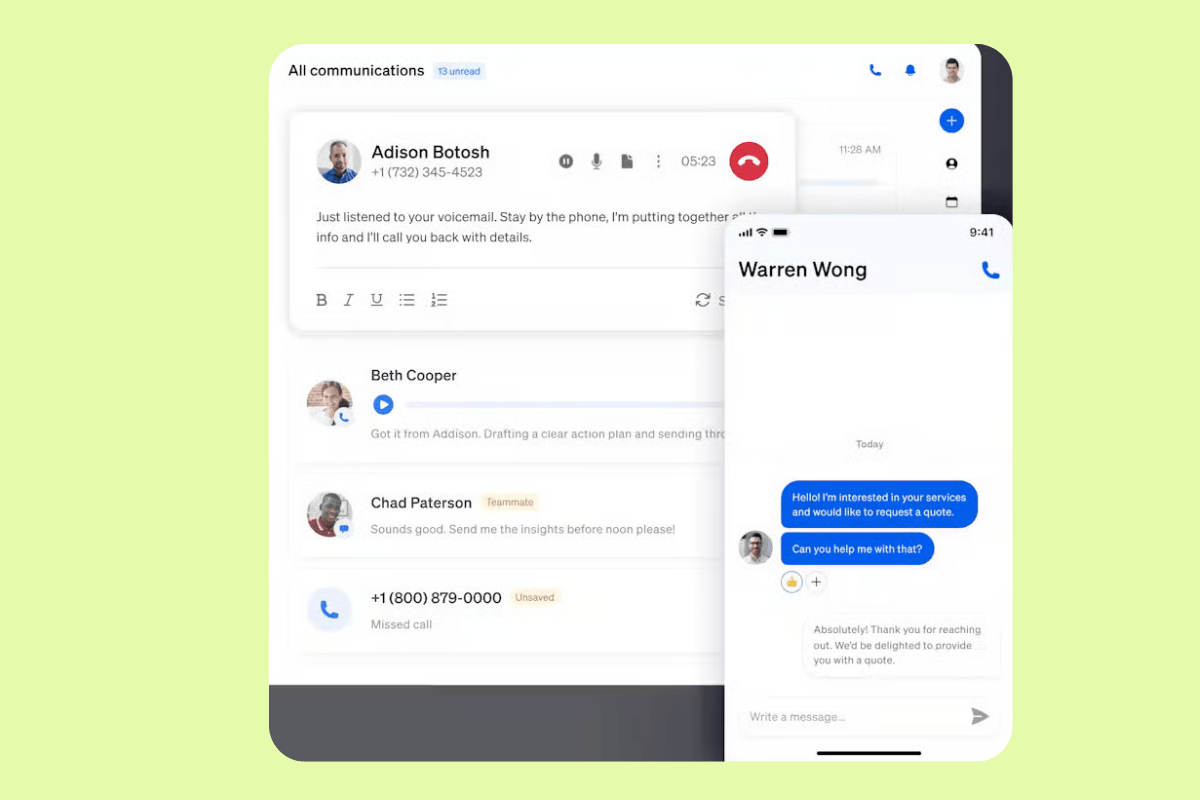
Nextiva is an AI-powered cloud contact center solution designed to unify customer communications within a single, scalable platform. Primarily focused on streamlining customer experience management (CXM), it provides businesses with tools to manage voice, digital, and social channels through a centralized interface. The software emphasizes ease of use and flexibility, offering tiered plans that cater to organizations ranging from growing small businesses to large-scale enterprises requiring high-volume interaction management.
The platform's key features include intelligent skills-based routing and IVR to direct customers properly. Real-time monitoring and historical reporting are also available. For operational management, Nextiva incorporates workforce optimization tools, such as quality monitoring and predictive scheduling, alongside reporting dashboards that track team performance and SLAs across all engagement channels. It's important to note that although the platform offers several features, configuring them may be difficult.
Pros | Cons |
|
|
What people are saying:
- “I like the ease of use of the platform, the computer application, and the mobile application.”—Verified user, G2 review.
- “While the platform is powerful some features can feel a bit complex for first time users especially during the initial setup or when integrating with third party CRMs.”—Verified user, G2 review.
- “While the platform works well overall, it can sometimes feel a bit overwhelming with the number of features. Some advanced settings aren’t as intuitive as the basics, so it takes a little trial and error to figure them out.”—Verified user, G2 review.
4. CloudTalk
Best for outbound calling teams
Starting price | Free trial | Key features |
$25 per agent/month | 14 days |
|
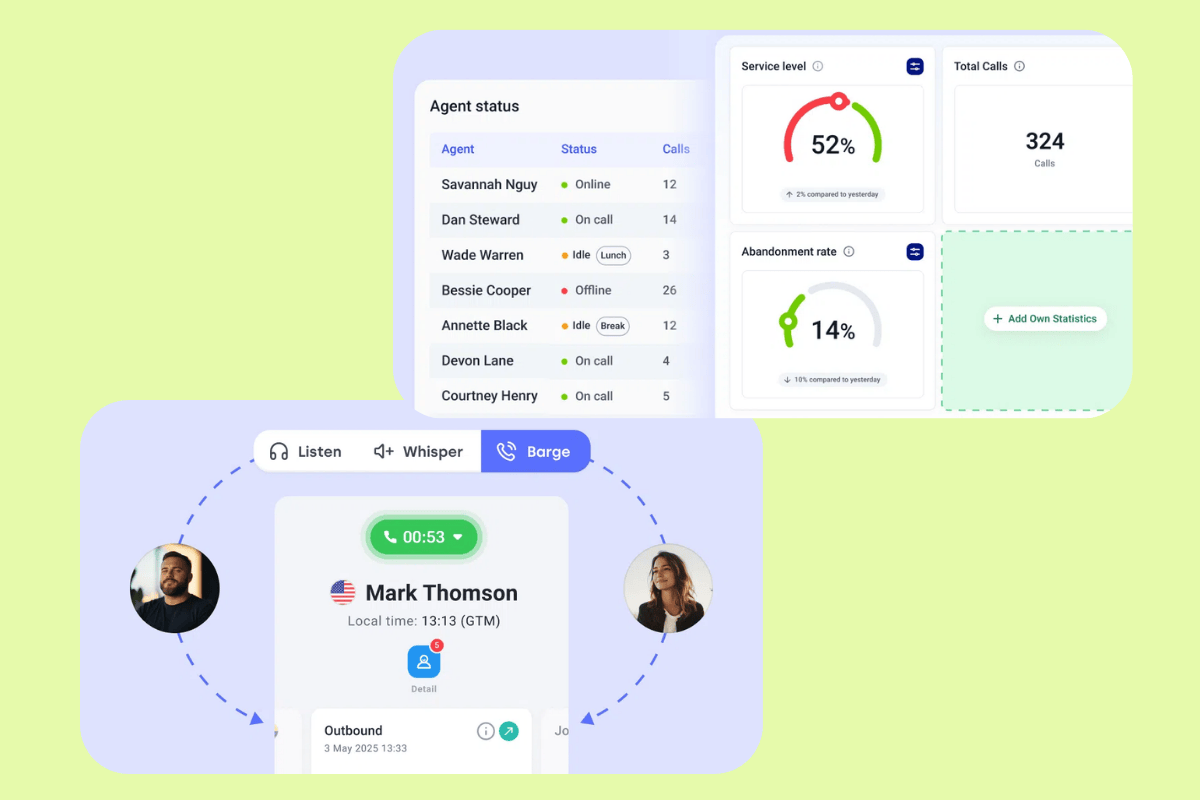
CloudTalk is an AI-powered business phone system and cloud contact center solution designed to centralize communication workflows. It provides a flexible, internet-based infrastructure that allows teams to manage customer interactions globally without physical hardware. The platform includes omnichannel communication capabilities, allowing teams to engage with customers across various digital touchpoints. It also features advanced routing and IVR to direct callers to the most qualified agents, as well as unified customer profiles to ensure every interaction is backed by relevant context.
Real-time monitoring and historical reporting are also available, alongside workforce optimization tools. It's worth noting that users report difficulties setting up advanced features. Finally, CloudTalk's apps and integrations with popular CRMs and security protocols ensure that data remains synced and protected across the entire organization.
Pros | Cons |
|
|
What people are saying:
- “I especially appreciate how easily it integrates with CRM tools like HubSpot and Salesforce, which helps streamline workflows... The automated call routing and CRM integrations eliminate manual work and reduce errors.”—Verified user, G2 review.
- “The interface is really easy to use and being able to use different numbers from different countries really help the communication to flow.”—Verified user, G2 review.
- “The pricing can also feel a bit high for smaller teams, and a few advanced features require extra setup time.”—Verified user, G2 review.
Learn more: Discover how CloudTalk integrates with Zendesk.
5. Talkdesk
Best for AI-driven enterprise CX

Starting price | Free trial | Key features |
$85 per agent/month | 15 days |
|
Talkdesk is a cloud-based, AI-powered customer experience platform designed to automate and modernize contact center operations. Its scalable infrastructure allows organizations to manage customer interactions across various industries, including healthcare, retail, and financial services. The platform is engineered to streamline the entire customer experience lifecycle by leveraging automated workflows and a global network architecture.
The software's suite of capabilities include omnichannel engagement, as well as advanced routing and IVR through its Talkdesk Studio. Agent and operational efficiency is supported by features like unified customer profiles, real-time monitoring, and historical reporting. To support high-performing teams, Talkdesk provides workforce engagement tools, quality management, and interaction analytics. However, users report a steep learning curve for advanced features. Finally, integrations with third-party apps are available, and industry-specific security and compliance standards meet diverse business requirements.
Pros | Cons |
|
|
What people are saying:
- “I like how Talkdesk is reliable and easy to use. The call routing works well, and the interface is intuitive, which allows me to quickly access call information, recordings, and logs without slowing down my workflow.”—Verified user, G2 review.
- “Talkdesk has price transparency issues, something that makes it hard for company to budget.”—Verified user, G2 review.
- “Some of the advanced features, like custom reporting or workflow automation, can also have a learning curve for new users.”—Verified user, G2 review.
Learn more: Discover how Talkdesk integrates with Zendesk and how Zendesk vs. Talkdesk compare.
6. 8x8
Best for global cloud communications
Starting price | Free trial | Key features |
Custom pricing | Unavailable |
|
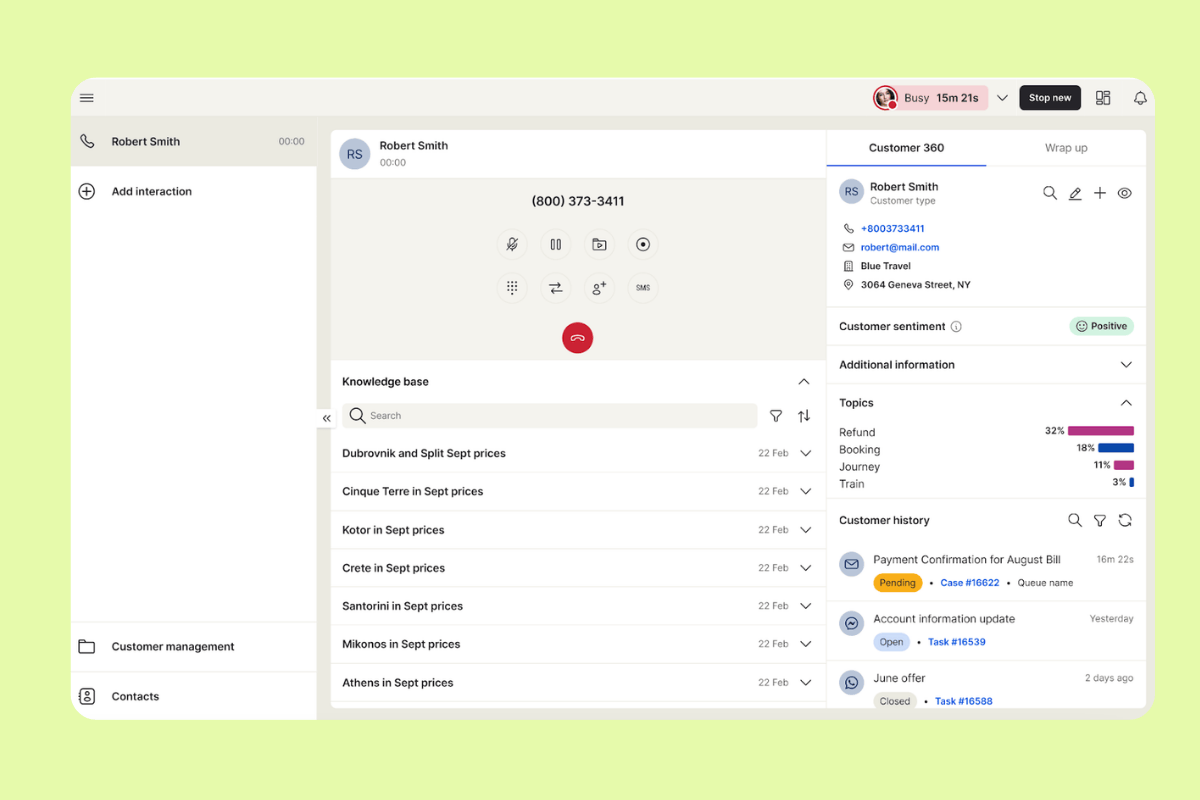
8x8 is a cloud-native solution designed to unify customer and employee experiences within a single platform. Supporting modern customer experience (CX) leaders, the software integrates contact center capabilities with unified communications, allowing organizations to manage global teams and customer interactions efficiently.
The platform's suite of tools includes omnichannel communication to manage voice and digital channels. It also provides intuitive workspaces tailored to agents and supervisors, alongside real-time monitoring and historical reporting to track performance and sentiment analysis. Additionally, 8x8 provides apps, integrations, and security certifications, ensuring a compliant and connected environment for high-volume service teams. However, it's important to mention that several users report that 8x8 has an outdated interface and steep learning curve.
Pros | Cons |
|
|
What people are saying:
- “The most helpful aspect has been the ease of use across our small insurance team. Whether on PC or Mac, the platform works seamlessly, and the ease of implementation made the transition simple from the start.”—Verified user, G2 review.
- “The only aspect I dislike about this is its interface, which I feel is in need of an update.”—Verified user, G2 review.
- “One common criticism is the learning curve—getting fully familiar with the platform can take some time, especially if you're new to cloud-based contact center solutions.”—Verified user, G2 review.
Learn more: Discover how 8x8 integrates with Zendesk.
Key cost factors behind cloud contact center platforms
Shifting to a subscription-based solution doesn't mean costs are limited to a set monthly fee. Several key factors influence the total cost of a cloud contact center platform. Let's explore them.

Pricing model and subscription structure
Prices can vary according to the billing cycle (monthly, annual, biannual), with annual billing often being cheaper in the long run.
Number of agents
The number of agents usually influences the final price of a solution, as many charge per user per month.
Features and capabilities included
The features included in each pricing plan are a major cost driver for cloud contact center platforms, ranging from basic to advanced. Lower-tier plans usually cover basic capabilities, while higher-tier plans include more advanced features, such as analytics and integrations.
Communication usage and volume
Many platforms charge per interactions through chat, messages, tasks, emails, or even add metered costs based on voice minutes.
Support levels and service options
Cloud contact center platforms usually charge more for offering premium customer support options. Service options also cost more: complex environments that need custom API integrations or advanced IVR flow designs require high one-time implementation fees.
Integrations, APIs, and third-party tools
Some cloud based contact center solutions charge connector fees to integrate with third-party tools and CRM modules. API implementation, usage, and ongoing maintenance can also increase costs.
Operational savings and long-term value
While the upfront costs of implementing a cloud contact center may be significant depending on your specific needs, there are still operational savings to be made. Cloud contact center software scales easily and uses AI to boost efficiency, which helps turn it from purely an expense into a source of revenue and customer insights. This is where the long-term value lies.
A guide to choosing the right cloud contact center
The right cloud contact center solution will align with your business's specific needs and goals. Follow these steps to make an informed decision.
Try before you buy
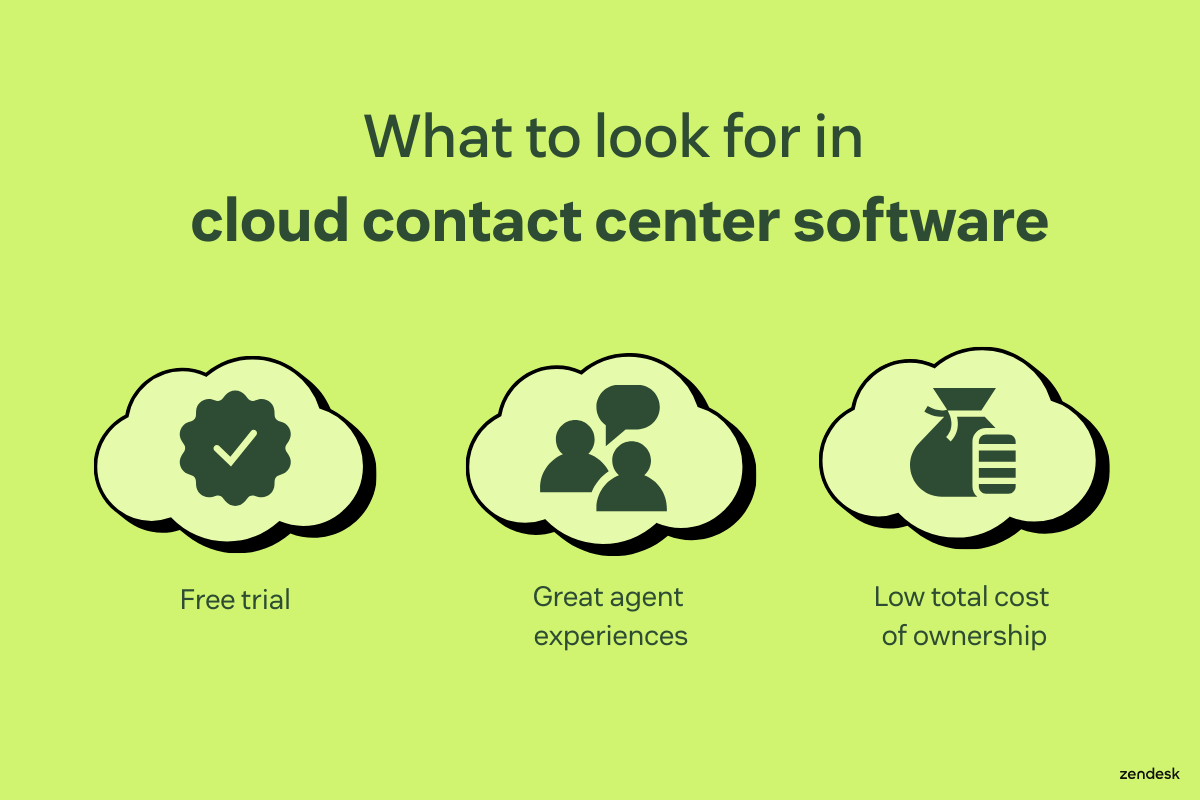
Trying a cloud contact center software before making a purchase is crucial as it allows you to assess the system's compatibility with your specific operational requirements. With the Zendesk free trial, for example, you can explore the software's features, user interface, and functionality in a real-world context for up to 14 days, gaining hands-on experience of its capabilities.
A trial period enables you to evaluate how well the software aligns with your workflow, integrates with existing systems, and meets the unique demands of your customer service operations. It also provides an opportunity to identify potential challenges or limitations before committing to a long-term contract.
Look for tools that create great agent experiences
When you make things easier for your employees, your business will experience better results. Judge the software based on the range of tools it provides and how easy it is for your agents to use. In addition to the key features laid out in this guide, look out for:
- Automation tools for repetitive tasks
- Chatbots and AI
- Self-service software
Evaluate the total cost of ownership
Beyond the initial licensing costs, factor in additional expenses such as implementation, customization, training, ongoing support, and potential scalability costs. Assessing the total cost of ownership (TCO) involves considering the software's long-term operational and maintenance expenses.
Cloud solutions often provide cost savings by eliminating on-premise hardware and reducing IT infrastructure management, but you should carefully analyze subscription models, potential overage charges, and hidden costs. For instance, Zendesk users can easily set up and customize their cloud contact center tools without hiring an army of developers, contributing to the software’s low TCO.
Customer support and vendor reliability
A cloud contact center provider isn't just a vendor. It's a critical part of your daily operations. Relying on strong customer support is essential for maintaining high uptime and long-term success. When technical issues pop up, the speed and quality of the support directly impact your ability to serve your customers.
A reliable vendor offers fast response times across multiple support channels (chat, phone, ticketing), ensuring help is available whenever needed. It's equally important that technical assistance is truly knowledgeable, rather than just troubleshooting or bug fixing. All in all, robust vendor support helps agents resolve issues quickly, supports IT teams during integrations or outages, and ensures a consistently smooth experience for both agents and customers.
Frequently asked questions
Try the best cloud contact center software today
Zendesk cloud contact center software allows you to ditch disjointed communication systems by integrating all the tools you need into a unified workspace. Agents work more efficiently with access to advanced features like AI, rich customer profiles, real-time analytics, and integrations with other business systems. See what Zendesk can do for you by starting a free trial today.
Related cloud contact center guides
Learn more ways to enhance communication, customer service, and employee experiences.
Take a walk in the cloud
You’ll be on cloud nine after you see what our cloud-based support solutions can do for you.