MCP Server
Connect Claude, ChatGPT and other AI assistants to your Zendesk data
Funciona com
Support
Developer
SwifteqSobre este aplicativo
MCP Server for Zendesk by Swifteq connects Claude, ChatGPT and other MCP-compatible AI assistants to your Zendesk account. Your assistant can search and read tickets, conversations, customers, Help Center articles, CSAT and ticket metrics, and, if you allow it, reply to and create tickets, draft Help Center articles and curate macros.
👉 Start free: create your Swifteq account
What your AI assistant can do
✅ Support reports and KPIs from one prompt: first reply time, resolution time, reopen and one-touch rates, by group, brand, agent, channel, week or month.
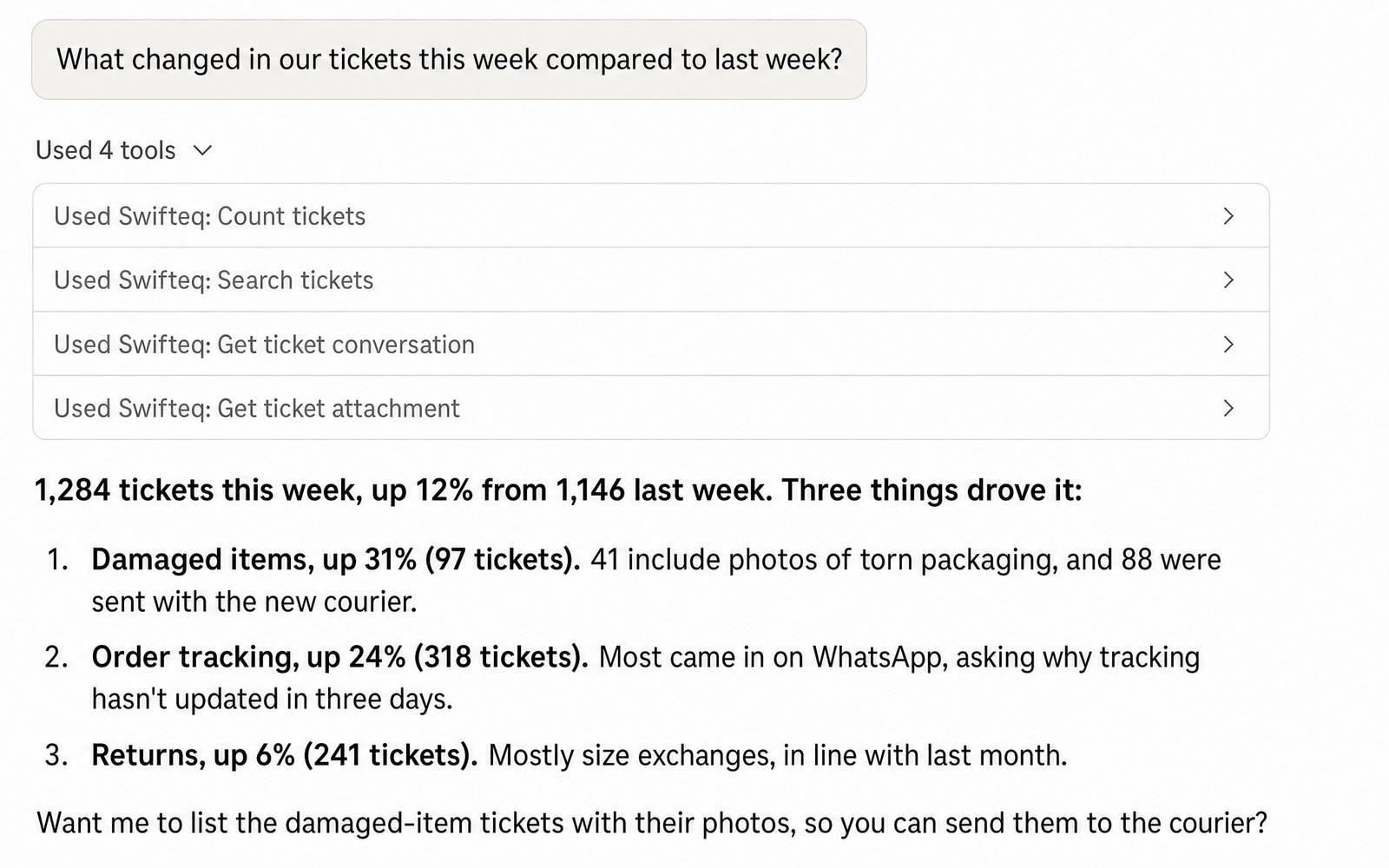
✅ Find what is driving ticket volume: search tickets with any filter and read full conversations, attachments and screenshots, across email, web, messaging and WhatsApp.
✅ Reply to, update and create tickets: internal notes or public replies, fields, tags, CCs, files and macros, and link incidents to a problem ticket.
✅ Keep your Help Center up to date: find content gaps, draft articles in your house style, and update articles, translations, categories and sections across every brand.
✅ Curate your macros: find unused and overlapping macros, then reword, create or deactivate them.
✅ Customers, CSAT and configuration: organizations and users with their custom fields, satisfaction ratings, triggers, fields and forms.
Works with your AI assistant
Claude (web, desktop and Claude Code) and ChatGPT are supported. Cursor, VS Code with GitHub Copilot and Microsoft Copilot Studio work too, and so does any client that supports MCP with OAuth sign-in. Setup guides
Permissions and security
🔒 Each teammate connects their own Zendesk login, so their Zendesk role and groups apply.
🔒 Read-only unless you allow changes. Public replies, publishing articles, changes to users and organizations, and changes to macros each stay off until an account owner turns them on.
🔒 Nothing can be deleted: there are no delete, merge or spam tools.
🔒 Hosted on AWS in Ireland. Swifteq holds SOC 2 Type 2 certification.
Pricing
Free for 500 MCP calls a month per Zendesk account, no credit card required. The Team plan has unlimited calls: 49 EUR a month covers your account and its first user, and each extra user is 9 EUR a month, so a team of 10 pays 130 EUR a month. Paid annually, it is 490 EUR a year plus 84 EUR a year per extra user. See pricing
About the developer: Swifteq is an independent company in Dublin, Ireland, and a qualified Zendesk technology partner. Our Automation, Help Center and Agent Assist apps help support teams work smarter.
Data privacy: The MCP Server reads the Zendesk data your login can see (tickets, users, organizations, Help Center, CSAT and configuration) only when your AI assistant asks, passes it to the assistant and does not store it. Swifteq keeps your account email and request logs without ticket content, runs no AI model and does not train on your data. Details: Security and data handling and swifteq.com/data-zendesk-apps
Detalhes do aplicativo
Como instalar
Create your free Swifteq account: https://agenthelper.swifteq.com/auth/mcpserver
Authorize your Zendesk account. Choose read only, or read and write if you want your AI assistant to make changes.
In Claude or ChatGPT, add a custom connector with the URL https://mcp.swifteq.com/api/mcp/mcp and sign in with your Swifteq account.
Ask your first question, for example: "How many tickets did we get last week, and what were the top five reasons?"
Step-by-step guides for Claude, ChatGPT and other AI assistants: https://support.swifteq.com/hc/en-us/categories/46593514234897-MCP-Server
Deixe uma avaliação
Compartilhe sua experiência com o resto da comunidade Zendesk