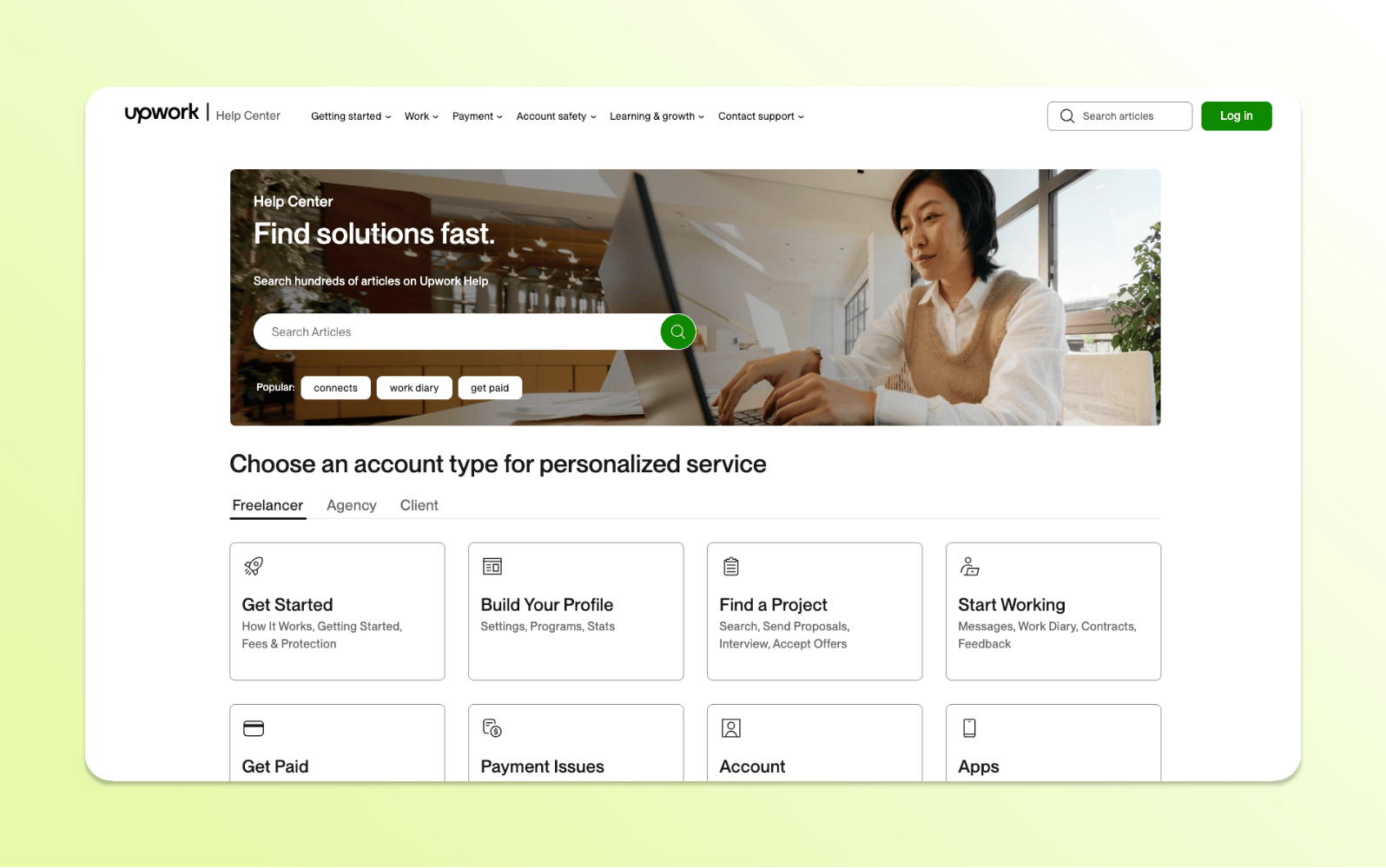
An FAQ page (frequently asked questions page) is a resource that displays answers to common questions about a company’s products, services, or policies. It uses simple question-and-answer pairs to make information easy to scan and quick to find. FAQ pages are often part of a larger help center or knowledge base. Content is organized for self-service and can support automated tools like AI-powered assistants. When done well, an FAQ page helps customers resolve issues faster without needing to contact support.
Contacting support is rarely a customer’s first choice. Most people want quick answers they can find on their own. When those answers are hard to find, simple questions turn into support tickets and frustrate both customers and agents.
That’s why FAQ pages matter. A well-designed FAQ page gives customers quick answers and reduces repetitive support requests. It also improves satisfaction by delivering help exactly when customers need it.
In this guide, you’ll learn what makes an effective FAQ page. We’ll share best practices, common mistakes, and real FAQ page examples.
An FAQ page provides quick answers to common questions about products, services, or policies. A help center offers more detailed resources, including guides, tutorials, and troubleshooting articles. FAQs focus on speed and simplicity, while help centers support deeper problem-solving.
Implement an FAQ page to address recurring questions and reduce simple support requests. Use a help center when customers need step-by-step guidance or detailed explanations. Many businesses use both together to deliver fast answers and comprehensive support.
Here’s a quick look at the differences between an FAQ page and a help center:
Feature
FAQ page
Help center
Purpose
Answer common questions quickly
Provide detailed support resources
Content type
Short Q&A pairs
In-depth guides, tutorials, and articles
Best for
Simple, recurring questions
Complex issues and troubleshooting
User experience
Fast and scannable
Structured and comprehensive
Role in support
First line of self-service
Full self-service support hub
Why are FAQ pages important for good customer service?
Customers expect fast answers when problems arise. FAQ pages help them find solutions quickly without waiting for support. They also reduce repetitive questions and make support operations more efficient.
Instant, 24/7 access to answers
FAQ pages give customers immediate access to answers anytime. Customers can solve problems independently across time zones, devices, and channels. Faster answers reduce frustration and improve overall customer satisfaction.
A single source of truth for customers
Centralizing information in one place makes it easier for customers to find reliable answers. Clear and consistent responses reduce confusion during research and decision-making. This transparency builds trust, especially for customers evaluating a purchase.
Fewer repetitive support requests
Reducing repetitive support inquiries helps teams work more efficiently. Customers can resolve simple issues independently instead of opening a ticket. This frees agents to focus on complex problems that require human expertise.
Greater visibility in search and AI
Carefully structured content improves visibility in search results. Additionally, clear questions and answers help content appear in AI summaries and featured snippets. This makes FAQ content a powerful entry point for new customers.
A balance between self-service and human support
Self-service can scale support without replacing human interaction. This is because customers are able to solve simple issues independently while still having the option to contact agents for complex situations. The balance of automation and empathy paves the way for better service experiences.
What should an FAQ page include?
Here are some examples of popular questions that businesses across industries answer in their FAQ. Feel free to copy and paste any of these and tweak them to your liking—or use them to come up with new questions.
Account:
How can I reset my password?
How do I edit my account information?
Can I reset my security questions?
General:
Do you have a warranty?
Do I need to sign a contract?
Do you have any physical locations?
Orders:
What is your return policy?
What should I do if my order is lost, stolen, or damaged?
How can I track my order?
When can I expect my preorder to arrive?
Payment:
What payment methods do you accept?
Do you sell gift cards?
How can I check my gift card balance?
Can I make a purchase using financing platforms like Klarna or Afterpay?
Do you offer Apple Pay?
Product or service questions:
What products do you offer?
What services do you offer?
Shipping and delivery:
How long does shipping take?
Do you ship internationally?
Do you offer free shipping?
Most of these questions work for any business, but you will need to come up with specific questions based on your unique offerings. This includes product-specific troubleshooting questions and answers about bugs or updates.
Did you know? While many think of FAQs as a basic list of questions and answers, some businesses incorporate them into a single section when building a larger help center. The help center functions as a comprehensive knowledge base that empowers customers to independently find solutions.
Within a knowledge base template, FAQs can function as standalone articles. For example, businesses can incorporate the question “How do I set up a password?” into a longer series such as “How to set up your account.”
Where can you publish an FAQ page?
Businesses have multiple strategic locations where they publish FAQ pages to maximize accessibility and customer satisfaction. The most common and effective approach is creating a FAQ page on your company website, typically accessible through the main navigation menu or footer links. This central location serves as a comprehensive resource that customers can reference at any time, reducing support ticket volume and improving user experience.
Here are some strategic placement locations:
Website navigation: Header, footer, or dedicated help/support menu section
Product and service pages: Contextual FAQs addressing specific offerings
Checkout and conversion points: Addressing common purchase hesitations
Customer portal or account dashboard: For existing customer support
Social media business profiles: Platform-specific FAQ features
Email signatures and automated responses: Link to comprehensive FAQ resources
Physical locations: QR codes linking to digital FAQ pages for in-person customers
The effectiveness of your FAQ strategy depends largely on meeting customers where they naturally seek information. Modern businesses benefit from a multi-channel approach that distributes FAQ content across digital touchpoints rather than relying solely on a single webpage. This might involve embedding contextual answers directly into user workflows or creating hybrid experiences that blend digital resources with physical customer interactions.
The goal is to create a seamless support ecosystem where answers are always within reach, regardless of how or where customers choose to engage with your brand.
19 FAQ page examples
Before building your FAQ page, you should know what features to include.
We rounded up 19 FAQ examples with unique characteristics—such as user experience (UX), design, and additional self-service offerings—that make these pages especially successful.
Customer care and self-service are at the core of our platform—and our customers see the impact every day.
Zendesk allows visitors to browse help center resources by solution (product), administrative topics, guides (for agents and developers), company and community news, and more. When users select a topic, our website will direct them to the correct page.
Our FAQ page also allows users to review commonly asked questions for accounts and billing, cross-product, and data privacy—all of which link out to support center articles.
Ad campaign company AdEspresso aims for simplicity on its FAQ page with only a handful of questions and answers. Each question, when clicked, goes to a micro-blog with hyperlinks that guide the user to more information.
And if readers don’t see the question and answer they’re looking for on the page, AdEspresso’s intro paragraph provides additional online resources, as well as the option to contact customer support.
The resulting FAQ page is straightforward, intuitive, and genuinely helpful—attributes any customer will appreciate.
Adobe, a company well known for its powerful design and editing products, opted for a more traditional FAQ approach by only listing questions and answers, proving that a simple design layout can still be effective.
The Creative Cloud FAQ page is successful because it offers several ways for users to search. These include:
A search bar
A sidebar menu that lists different categories
A set of commonly asked questions separated by category headings
A virtual assistant chat feature
As a bonus, Adobe ends the page by requesting reader feedback to improve its FAQ offerings.
Airbnb is the first knowledge base FAQ in this roundup. Rather than adopting a typical Q&A format, the homestay and experiences company lists several common questions for hosts and links to robust resource pages.
The resource articles answer questions in several different ways, including:
Scannable copy
Hosting tips
Videos
Animations
Because this particular knowledge base is centered on the hosting experience, Airbnb also provides opportunities for users to ask other hosts questions via a community forum.
Cloud collaboration company Airtable allows customers to take an active role in their own customer service experience, offering users a comprehensive help center where they can search for solutions to their questions or browse through detailed documentation for the issues they’re experiencing.
Airtable customers can filter through articles and guides by selecting a support category at the top of the page or scrolling down to explore different sections, such as tutorials, troubleshooting guides, and frequently asked questions.
This self-service alternative allows customers to find immediate answers through searchable knowledge base articles rather than waiting for a customer service representative.
Ancestry teaches customers about their genealogy through DNA and data. So, it’s not surprising that the company’s FAQ page offers a highly personalized experience.
If you sign in before browsing through the FAQs, Ancestry tailors the suggested links based on your account and unique genetic results.
It’s a nice touch and allows Ancestry to show customers that it understands them.
DoggieLawn, an eco-friendly dog potty grass distributor, has a pretty standard-looking FAQ page at first glance, with easy-to-read font, scannable answers, and accordion questions. But it uses some live chat best practices that take it a step further.
DoggieLawn’s FAQ page offers a live support option, so customers can quickly chat with a rep when necessary. If users browse the page Monday through Friday between 5 a.m. and midnight (PT), a chat box in the bottom left corner will connect them with a live rep.
This is a great solution if the answer customers need isn’t on the FAQ page. And by keeping this chat feature on the FAQ page, DoggieLawn encourages customers to stay on its site while an agent addresses their issue or question.
The Etsy Help Center has an organized format that caters equally to sellers and shoppers. The e-commerce company leads with a search bar to help users find what they’re looking for faster. And immediately under the search bar is a “get help with an order” button, making it quick and simple for customers to get support for their orders.
Another cool thing Etsy does is provide two menus—one for shoppers and one for sellers—with appropriately themed help topics. This way, shoppers and sellers can find relevant resources easily without digging through articles for the other group.
Online subscription retailer Fabletics has a distinct FAQ page. Opening with a catalog of categories (and a search bar), users choose a topic before the page sends them to their next stop: a list of frequently asked questions.
Users can then select a question for a detailed answer, and they are offered a list of related questions and subjects in a sidebar.
Liquid Death’s FAQ page is simple yet effective. The largely untraditional brand makes it easy for users to quickly scan the page and find their questions before clicking on the plus sign to reveal the answer.
The FAQ page design also ensures that different categories are legible and easily distinguishable, with gold text in the headings and convenient accordion dropdowns.
Mailchimp’s FAQ webpage offers several opportunities for users to contact support through call-to-action (CTA) buttons or via the chat feature at the bottom of the page. The company even provides instructions in the FAQs to help users request customer service.
The email automation company also enhances the UX using a sidebar with a category overview and jump-to links, information about additional resources, and messages that encourage sales conversions.
The McDonald’s FAQ page is simple, but we like it because it incorporates filters—a great feature that enhances the user experience.
The fast-food chain has over 200 help center articles, and rather than endlessly tapping the “Load more” button, readers can use filters to narrow down results.
While the UX design is a bit lackluster, Microsoft still achieves a solid FAQ page that helps visitors quickly navigate through topics without taking them off-page.
At the top of the Microsoft 365 page, there’s a jump-to list. In this case, it’s an unordered list of all the categories the page covers. When the user clicks on a subject, the page automatically takes them to the correct category or question.
Nintendo boasts a traditional, streamlined FAQ page. Due to its length, Nintendo’s FAQ utilizes jump-to lists, allowing users to click on a question that relates to their own and jump to the section of the page that answers it.
The video game company also creates a strong self-service experience by sharing answers in a readable format, along with different language options. Most questions follow a standard structure: They explain a tool or concept and then elaborate on the resolution.
This strategy ensures that users find answers to all aspects of their questions, increasing the likelihood of finding a resolution.
Vrbo’s FAQ page has accessible filters for travelers, property owners, and property managers to easily find articles targeting their demographic. It’s filled with relevant stock photography to help users find the articles they’re looking for without visually clogging the page.
The FAQ page successfully follows best practices such as organized categories, jump-to links, accordion dropdowns, and a rating survey. All these features improve scannability and ongoing customer satisfaction.
Wandering Bear’s FAQ page stands out thanks to its humorous, thorough, and informative answers. The brand is known for its quirky voice, so humor is a great addition to its FAQ page. It shows the coffee retailer’s personality and may even disarm an irritated customer searching for a solution.
The WhatsApp FAQ page takes a unique approach. On the left, it has a table of contents with a drop-down menu. Users can select any category to see all options and quickly find the best match for their query.
Or, for common questions, visitors can peruse the right side of the page for popular topics and articles. WhatsApp also has a search bar at the top of its help center for people who prefer to search for an answer like they would with a standard search engine.
Wistia, a video content hosting platform, boasts an FAQ page with a floating footer that follows you as you scroll down the page. The page highlights top questions and recent anchor articles, like annual reports.
The footer contains the same search bar as the top of the page, plus a button to easily submit a support ticket. This means customers can explore the knowledge library, but as soon as they need more help, there’s a way to ask for assistance immediately.
How to create an FAQ page: 8 best practices
FAQ pages should be thorough, easy to navigate, and genuinely helpful. To create that kind of customer self-service experience, follow these universal FAQ best practices.
1. Use AI-powered data to pick the right questions
To create a comprehensive FAQ page or suggest related questions, teams focused on knowledge management should be prepared to analyze a lot of customer interaction data. Use tools like Google Search Console (GSC), sales and support data, knowledge management systems, and other metric tracking tools to understand customer needs and questions.
You should also leverage AI-powered customer analytics when scaling self-service to identify trending topics and emerging customer pain points that may not be immediately obvious in traditional data analysis.
Data must inform your FAQ questions for it to effectively:
Answer customer questions.
Support new and returning customers.
Cater to varying search intent.
Enable AI to autonomously suggest new FAQ topics based on pattern recognition in customer inquiries.
Facilitate rapid content creation through AI-generated article drafts that address popular topics.
Talk to your support agents as well. They’re able to tell you the questions they’re regularly fielding or handling so you can create self-service articles to direct customers to.
Implementing AI-driven quality assurance (QA) that analyzes 100 percent of agent interactions in real time is a key step in automating the FAQ creation process. These insights inform AI, which can then take the reins, allowing your team to focus on refining and personalizing the AI-suggested responses rather than starting from scratch.
2. Answer questions in multiple formats
People have different learning styles and preferences—this also applies to how people search.
“There are some people who are going to type the whole sentence and some people who are going to type two keywords,” says Madison Hoffman, director of self-service and automation at Zendesk. “Understanding how your customers describe their issue makes it likelier that you’ll get your FAQ in front of them via search.”
The four primary learning styles you should keep in mind are:
Visual
Auditory
Kinesthetic
Reading and writing
Factors like urgency or subject matter may influence how customers consume knowledge. If a concept is confusing, a viewer may prefer to watch a video with step-by-step instructions. If it’s a simple yes or no question, they’ll likely want a fast, one-sentence answer.
3. Decide how to structure the FAQ section
If you present all your FAQs as one long list, customers may tire of searching for the answer they need. Instead, organize your FAQ page by topic, grouping inquiries that address the same subject. If you have a lot of information to cover, you may need to make separate FAQ pages for different audiences or use cases.
Once you identify the most frequently asked questions, pay attention to the precise wording and phrasing customers use. Mimic your audience’s language patterns to make questions more scannable, contributing to a seamless online customer experience.
4. Settle on an FAQ page design
Another way to make FAQ pages more engaging is to break up the text with helpful graphics, pictures, or short videos. FAQ page design can encourage more customers to use self-service.
Customers increasingly expect visual guidance when learning how to solve a problem. Screenshots and short video tutorials provide another way for people to understand instructions.
Although creating video content can take more time, customers appreciate the effort. If a recorded tutorial clearly explains a concept, support agents won’t need to repeat those instructions.
5. Make your FAQ page easy to find
Help users find your FAQ easily by linking to it on highly visible pages. This includes your homepage, landing page, or navigation menu. You can also attract attention by sharing it in your social media bios on platforms like Facebook, Instagram, and LinkedIn.
Here are some examples of URLs that can help Google recommend your page so customers can find it:
website.com/how-it-works
website.com/faq
website.com/frequently-asked-questions
website.com/support
website.com/help-center
6. Make it easy for users to contact support
On an FAQ page, you should also incorporate multiple opportunities for customers to contact a support agent if they can’t find their answer. You can do this in a few different ways.
Sticky navigation menu: All businesses should link to their contact page in the navigation bar at the top of their website. They can also make their nav bar sticky so it will stay in view as the user scrolls. This makes it easy for users to contact support without wasting time or losing their place.
Chat: Add a chat widget to your business website so users can receive help from an AI agent or via live chat. Live chat and virtual agents are great for delivering real-time support as part of a strong customer self-service experience.
CTAs: If you have a long FAQ page, consider strategically placing call-to-action sections so users can easily contact a company representative for help. Placing a CTA near sales-related topics also offers an opportunity for conversion.
7. Track progress and performance
Once your FAQ is live, continuously monitor its performance to determine when updates are needed. You can do this by monitoring:
Page traffic: If you publish an FAQ with relevant keywords and valuable content, you should start to see an uptick in traffic. If you notice a drop in traffic after a few months, it may be time to make updates.
Bounce rates: If your FAQ links out to other pages on your site, this is an important way to understand if people are finding content that applies to them. Review the data to see what questions you still need to answer when you see high bounce rates.
Returning visitors: If a user comes back to your FAQ multiple times, chances are they successfully found answers there in the past and consider it a good resource.
8. Build processes for updating information
Set criteria for updating your FAQ. What must occur to warrant an update? Some common reasons include:
A good FAQ page is an important part of a knowledge base. You can conduct business without it, but having one helps save operational costs and makes it easier for customers to solve their own problems.
You don’t have to use a traditional FAQ page to answer every frequently asked question. Here are some other options:
AI agents: When customers type their query in a chat or messaging conversation, an AI-powered agent can suggest a relevant article and ask if it solves their problem—no searching or scrolling required.
Videos: Audiovisual learners may benefit from videos that answer their questions. To accommodate these people, you can create live tutorials or explainer videos.
Infographics: For questions with step-by-step answers, like “How do you build a dresser?”, infographics can break down the solution into bite-sized pieces and further support readers with visuals.
Off-page guides: Knowledge base FAQs often guide users to forums or off-page to comprehensive guides that cover everything there is to know about a specific process, product, service, or feature.
These FAQ solutions can serve as a part of a knowledge base without following a Q&A format.
Keywords: Incorporate topical keywords that can help your site rank at the top of search results, especially for local searches.
Internal linking: Link to other pages on your website to create a natural path for users to follow.
FAQ schema markup: This piece of code helps Google understand that the page contains a list of questions and answers and ranks on the SERP (search engine results page) accordingly.
If you use all of these and keep your FAQs clean, concise, and informational, you may also start to appear in featured snippets. These are boxes Google highlights on the SERP to quickly answer a question or attract users to a high-caliber resource.
A search bar helps users quickly find the answers they need on an FAQ page. Instead of scanning long lists of questions, customers can search keywords and locate relevant information instantly. This improves the self-service experience and reduces frustration.
Search bars are especially valuable for large FAQ pages or help centers with many topics. They help customers resolve issues faster while reducing repetitive support requests. As a result, support teams can focus on more complex customer needs.
Zendesk AI helps IRC-CEO scale trust with human dignity
“With Zendesk, we’re able to offer consistent and dignified service at a scale that simply wouldn’t be possible otherwise. It ensures we never lose sight of the human being on the other end of every interaction.”
Creating an FAQ page is the first step towards delivering a self-service solution. However, to get the most out of your FAQ software, consider turning questions into macros in your ticketing system to provide automated responses during customer chats.
It’s also a good idea to build training videos, community forums, or a how-to article series. Zendesk can help enhance these channels with AI by automatically suggesting related content, personalizing recommendations based on user behavior, and even generating new FAQ entries from common support ticket themes.
Once you’re offering an omnichannel customer self-service portal powered by intelligent automation, you’ll be well on your way to forming a comprehensive help center that empowers your customers to find their own solutions while reducing support workload through smart AI assistance.
Lauren Hakim
Director, Product Marketing
As Director of Product Marketing at Zendesk, Lauren leads go-to-market strategy for AI Agents and Knowledge. She focuses on how AI can improve resolution rates and empower support teams through scalable automation and smarter self-service.
Start your FAQ page quickly with this free guide
Download this free FAQ guide for a quick start to self-service.